Here’s something that frustrates millions of Cash App users every week paying $2.50 or more every single time they withdraw their own money from an ATM. That adds up fast. If you withdraw cash twice a week, you’re spending over $260 per year in ATM fees alone. But here’s the good news: free ATM for Cash App withdrawals are genuinely available; you just need to know how to qualify and where to find them.
Cash App has a built-in ATM fee waiver program that most users don’t know about. Additionally, several ATM networks work particularly well with the Cash Card. Understanding how the system works puts real money back in your pocket every month.
In this guide, you’ll learn exactly how to get free ATM withdrawals with your Cash App Cash Card, what the fee waiver conditions are, which ATM networks to prioritize, how to find no-fee ATMs near you, what alternatives exist for getting cash without any ATM fees, and how Cash App compares to similar apps on this specific issue.
Let’s get into it.
How Cash App ATM Fees Work The Basics
Before finding a free ATM for Cash App, it helps to understand exactly what fees apply and when.
The Cash App Cash Card is a Visa debit card linked directly to your Cash App balance. When you use it at an ATM, two types of fees can apply:
Cash App’s own ATM fee: Cash App charges $2.50 per ATM withdrawal regardless of which ATM you use. This is Cash App’s flat fee, applied on top of any operator charges.
ATM operator fee: The ATM’s owner, a bank, convenience store, or independent operator may charge an additional “out of network” or “operator” fee. This typically ranges from $1.50 to $3.50 and appears as a separate charge at the ATM screen before you confirm.
Combined, these two fees can make a simple $20 cash withdrawal cost $5 or more in fees 25% of the amount you’re withdrawing. For small withdrawals, that’s genuinely painful.
When Does a Cash App Waive Its Fee?
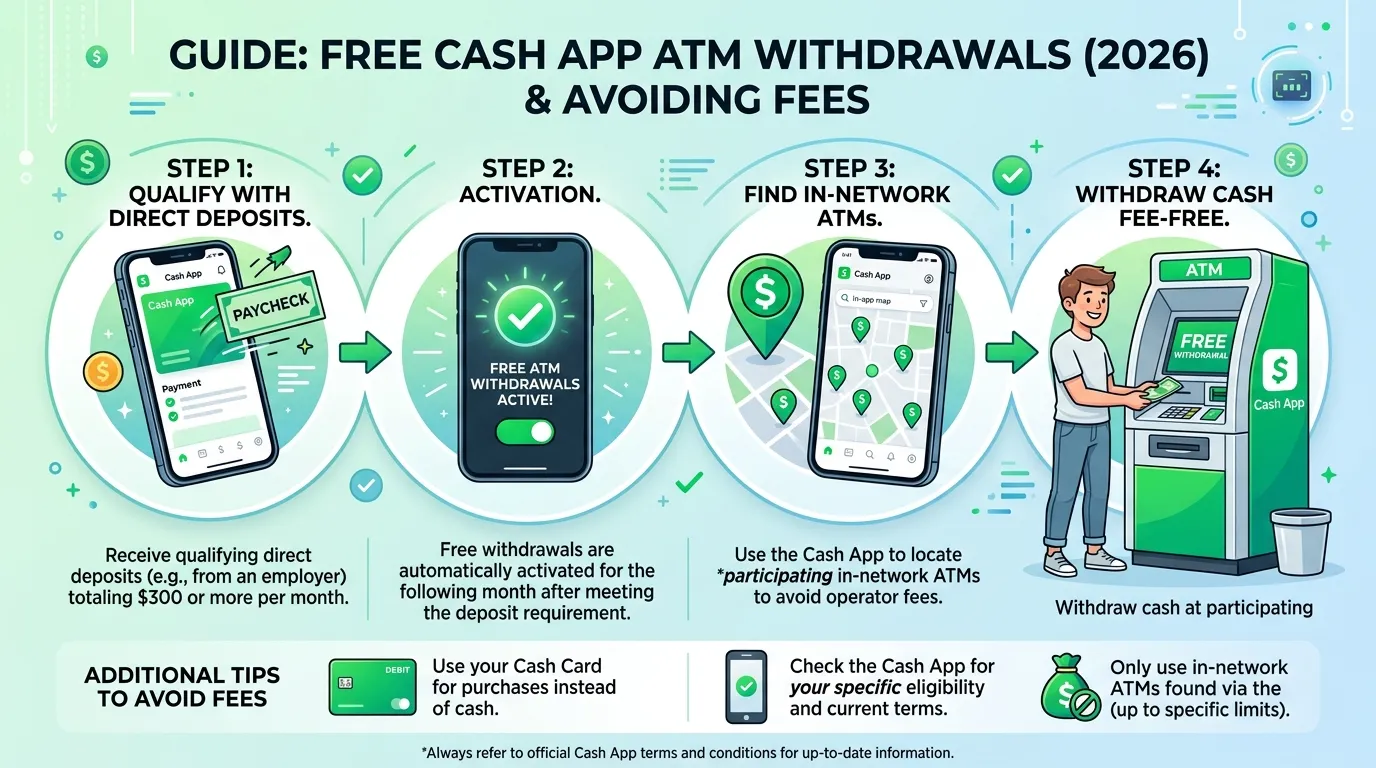
Cash App waives its $2.50 ATM fee and reimburses up to two additional ATM operator fees per month for Cash Card users who receive at least $300 or more in direct deposits within any rolling 31-day period.
This is the single most important thing to know about getting a free ATM for Cash App access. The fee waiver is automatic and applies as soon as you meet the direct deposit threshold.
Practical Tip: Log into Cash App and go to Cash Card → ATM Fee Reimbursements to check whether you currently qualify for free ATM withdrawals. The screen clearly shows your current direct deposit total for the rolling period and whether the waiver is active.
How to Get Free ATM Withdrawals with Cash App
The path to free ATM for Cash App withdrawals runs through one requirement: setting up direct deposit through Cash App and receiving at least $300 per rolling 31-day period.
Setting Up Direct Deposit on Cash App
Direct deposit through Cash App is free to set up and works like any bank direct deposit. Here’s how:
- Open Cash App on your Android device
- Tap the “$” icon on the home screen
- Select “Direct Deposit” from the menu
- Find your account number and routing number Cash App provides these for your Cash App account
- Give these numbers to your employer or benefits provider in place of traditional bank account details
- Wait for your first deposit Cash App processes direct deposits up to two days earlier than many traditional banks
Once your employer processes your payroll using Cash App’s routing and account numbers, the funds deposit directly to your Cash App balance. Any deposit paycheck, government benefit, freelance payment, or gig income counts toward the $300 threshold.
What Counts as Direct Deposit
Cash App counts the following as qualifying direct deposits:
- ✅ Employer payroll via ACH transfer
- ✅ Government benefits (Social Security, unemployment, disability)
- ✅ Tax refunds deposited directly
- ✅ Freelance or gig platform payouts via ACH
- ❌ Person-to-person Cash App transfers do NOT count
- ❌ Bank transfers you initiate yourself do NOT count
The key distinction is that the deposit must come from an external party via ACH not from another Cash App account or a personal bank transfer you initiate.
Practical Tip: If your employer pays less than $300 per month through direct deposit, consider depositing multiple income sources into Cash App freelance payments, side income, or government benefits until the combined total reaches $300 in a rolling 31-day window.
Which ATMs Work Best with Cash App Cash Card
Even with the fee waiver active, knowing which ATMs to use maximizes your free ATM for Cash App experience. Some ATM networks and locations work more reliably with the Cash Card than others.
ATM Networks That Accept Visa Debit Cards
The Cash Card is a Visa debit card that works at any ATM that accepts Visa. However, operator fees vary significantly by location and network. Here’s a breakdown of common ATM types:
Bank-Owned ATMs
ATMs owned by major banks Wells Fargo, Chase, Bank of America, TD Bank typically charge between $2.50 and $3.50 for out-of-network users. If your fee waiver is active, Cash App reimburses up to two of these operator fees per month. However, using bank ATMs regularly without the waiver gets expensive quickly.
Retail ATMs
ATMs located inside retail stores Walgreens, CVS, Target, Walmart often charge slightly lower operator fees than standalone bank ATMs. Some Walgreens ATMs charge as little as $1.50 as an operator fee. With the Cash App fee waiver, these can effectively become free.
AllPoint Network ATMs
The AllPoint ATM network is one of the best options for Cash Card users. AllPoint ATMs appear in thousands of retail locations including Target, CVS, Walgreens, and Costco. While Cash App doesn’t have a formal partnership with AllPoint, many AllPoint ATMs charge lower operator fees than bank-owned machines and with the waiver active, your net cost can reach zero.
Avoid Standalone Convenience Store ATMs
Standalone ATMs in gas stations, bars, and small convenience stores typically charge the highest operator fees, often $3 to $5. These eat into your balance significantly and aren’t worth using unless absolutely necessary.
Practical Tip: Always check the operator fee displayed on the ATM screen before confirming your withdrawal. The ATM must show you the fee before you agree to proceed if the operator fee seems high, cancel and find a different machine.
How to Find Free ATMs Near You for Cash App
Finding a free ATM for Cash App near your current location is straightforward with the right tools.
Use the Cash App ATM Finder
Cash App includes a built-in ATM finder accessible through the Cash Card section of the app:
- Open Cash App and tap the Cash Card icon
- Tap “ATM” or look for the ATM finder option
- The map shows nearby ATMs that accept your Cash Card
This built-in finder shows ATM locations but doesn’t always display operator fee amounts. Use it to find nearby options, then check the fee at the machine itself before withdrawing.
Use Google Maps
Search “ATM near me” in Google Maps for a quick overview of nearby options. Filtered by major bank branches or retail store locations, these typically have lower operator fees than standalone machines. Tap any ATM pin to see the location’s hours and reviews.
AllPoint ATM Locator
Visit allpointnetwork.com or use the AllPoint ATM Locator app to find AllPoint-network ATMs near you. AllPoint has over 55,000 ATM locations across the US, primarily in retail stores. While Cash App doesn’t formally partner with AllPoint, these ATMs generally offer competitive operator fees.
Largest Retail Store ATMs
For reliably lower operator fees, head to ATMs inside:
- Walgreens often $1.50–$2.00 operator fee
- CVS Pharmacy typically $2.00–$2.50
- Target usually $2.00–$2.50
- Walmart often $2.00–$3.00 depending on the machine
With Cash App’s waiver covering up to two operator fee reimbursements per month, visiting these locations gives you effectively free withdrawals twice a month.
Practical Tip: Save your two monthly ATM fee reimbursements for larger withdrawals when you know you’ll need cash. Withdraw $200 in one trip rather than $40 five times you get the same cash but use only one of your two monthly reimbursements.
Alternatives to ATM Withdrawals Getting Cash Without Fees
Sometimes the best free ATM for Cash App strategy is avoiding ATMs entirely. Several alternatives provide cash without any withdrawal fees.
Cashback at Retail Stores
Many grocery stores, pharmacies, and retailers offer cashback at checkout when you pay with a debit card. You add $20, $40, or up to $100 cashback to your purchase total and receive the cash directly from the cashier no ATM fees apply.
Stores that commonly offer cashback include:
- Walmart up to $100 cashback per transaction
- Kroger and affiliated grocery chains up to $100
- Walgreens up to $20 at some locations
- Dollar General up to $40
To use this with your Cash Card, simply pay for a small purchase and ask for cashback when the payment terminal prompts you. The cashback amount draws from your Cash App balance with no extra fees.
Transfer to a Bank Account
If you have a linked bank account, you can transfer your Cash App balance to that account and withdraw from your bank’s free ATM network. Standard transfers take 1–3 business days and are free. Instant transfers cost 0.5%–1.75% (minimum $0.25), which may or may not be cheaper than ATM operator fees depending on the amount.
Pay Directly with Cash Card
The simplest way to avoid ATM fees entirely is using your Cash Card for purchases rather than withdrawing cash. The Cash Card works anywhere Visa is accepted online, in stores, for subscriptions, and for bills. Reducing your reliance on cash reduces your need for ATM withdrawals altogether.
Practical Tip: Before your next ATM visit, check whether the store you’re heading to offers cashback at checkout. Getting $40 cashback while buying $5 worth of groceries costs nothing extra and saves your monthly ATM reimbursements for situations where cashback isn’t available.
Cash App ATM Fee Reimbursement How It Actually Works
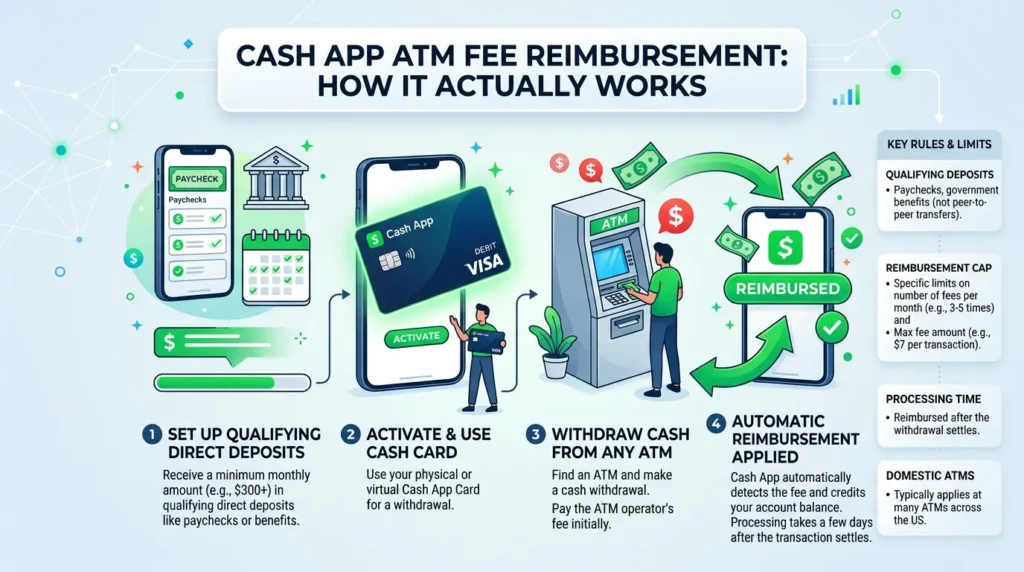
Understanding the reimbursement mechanics ensures you don’t get surprised by unexpected charges when using a free ATM for Cash App.
The Reimbursement Process
When you use an ATM with your Cash Card while the fee waiver is active:
- Cash App’s own $2.50 fee is waived automatically it never appears on your statement
- The ATM operator fee is charged to your Cash App balance at the time of withdrawal
- Cash App reimburses the operator fee typically within seconds but sometimes up to a few minutes after the transaction
You’ll see the operator fee and the reimbursement as two separate line items in your Cash App transaction history. The net effect is zero cost for the withdrawal.
The Two-Reimbursement Limit
Cash App reimburses up to three ATM fees per month total (its own $2.50 fee is always waived; plus two operator fees reimbursed). After your second operator fee reimbursement in a calendar month, Cash App no longer reimburses additional operator fees though its own $2.50 fee remains waived as long as your direct deposit stays active.
What Happens If You Don’t Meet the $300 Threshold
If your direct deposit drops below $300 in a rolling 31-day period, the fee waiver deactivates. Cash App’s $2.50 fee resumes applying to all ATM withdrawals, and no operator fee reimbursements occur until the threshold is met again.
Monitor your direct deposit total in the Cash App settings to confirm your waiver status before making large withdrawals.
Practical Tip: Check your reimbursement count in the Cash App before your third ATM visit of any month. Going to Settings → Cash Card → ATM Fee Reimbursements shows how many reimbursements you’ve used. If you’ve hit the limit, use cashback at a retail store instead.
Cash App vs Other Apps ATM Fee Comparison Table
| App | Own ATM Fee | Fee Waiver Available | Waiver Requirement | Operator Fee Reimbursed | Free ATM Network |
| Cash App | $2.50 | ✅ Yes | $300/month direct deposit | ✅ 2 per month | Any Visa ATM |
| Chime | $0 | ✅ Yes always | Direct deposit required | ✅ Yes | MoneyPass + Visa Plus Alliance (60,000+ ATMs) |
| Venmo | $2.50 | ❌ No | N/A | ❌ No | Any Visa ATM |
| PayPal | $2.50 | ❌ No | N/A | ❌ No | Any Visa/Plus ATM |
| Current | $0 | ✅ Yes | $500/month direct deposit | ✅ Yes | Allpoint network |
Frequently Asked Questions
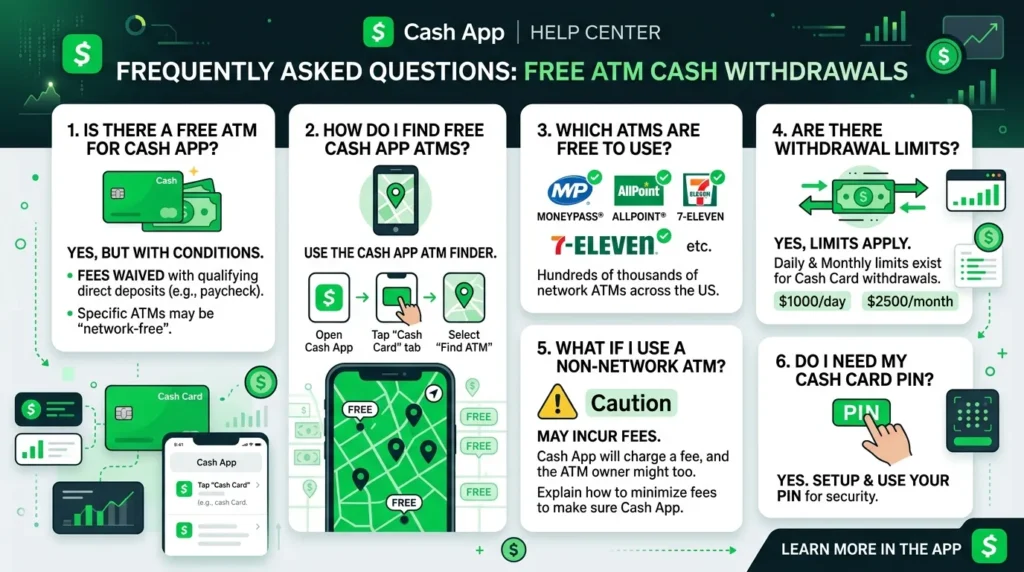
How do I get free ATM withdrawals with my Cash App Cash Card?
To qualify for free ATM for Cash App withdrawals, set up direct deposit and receive at least $300 in a rolling 31-day period. Once this threshold is met, Cash App automatically waives its $2.50 ATM fee and reimburses up to two ATM operator fees per month. Check your eligibility in the Cash App under Cash Card → ATM Fee Reimbursements.
Which ATMs are completely free to use with Cash App?
No ATM network is officially designated as completely free for Cash App users. However, with the fee waiver active from qualifying direct deposits, you effectively get two free ATM withdrawals per month at any ATM that accepts Visa. Lower-fee ATMs at Walgreens, CVS, and Target maximize the value of your monthly reimbursements.
What counts as a direct deposit for Cash App’s ATM fee waiver?
Qualifying direct deposits include employer payroll via ACH transfer, government benefits like Social Security and unemployment, tax refunds, and freelance or gig platform payouts sent via ACH. Person-to-person Cash App transfers and bank transfers you initiate yourself do not count toward the $300 direct deposit threshold.
How many free ATM withdrawals do I get per month with Cash App?
With the direct deposit fee waiver active, Cash App waives its own $2.50 fee on all ATM withdrawals and reimburses up to two ATM operator fees per month. This effectively gives you two completely free ATM withdrawals per month. After the two operator fee reimbursements, Cash App still waives its own fee but doesn’t reimburse additional operator charges.
Can I get cash from a Cash App without using an ATM?
Yes, several alternatives avoid ATM fees entirely. Cashback at retail checkout counters like Walmart, Kroger, and Walgreens lets you receive cash with a purchase at no extra charge. You can also transfer your Cash App balance to a linked bank account for free (1–3 business days) and withdraw from your bank’s free ATM network. Using your Cash Card directly for purchases rather than withdrawing cash is the simplest fee-free option.
Conclusion
Getting free ATM for Cash App access comes down to one key action: setting up direct deposit and keeping it above $300 per month. Once that threshold is met, Cash App automatically waives its fees and reimburses two operator fees monthly, giving you genuinely free cash withdrawals twice a month at any Visa ATM.
To recap the three key takeaways: qualify for the waiver by setting up direct deposit of $300+ monthly; use lower-fee ATMs at retail locations like Walgreens and Target to maximize your reimbursements; and use cashback at checkout whenever possible to preserve your monthly ATM reimbursements for when you really need them.
Setting up a direct deposit on Cash App today takes less than five minutes and immediately puts you on the path to free ATM access.
Here’s a question worth considering: how much are you currently spending on ATM fees each month, and would free Cash App ATM access make a meaningful difference to your budget? Share your thoughts in the comments below.