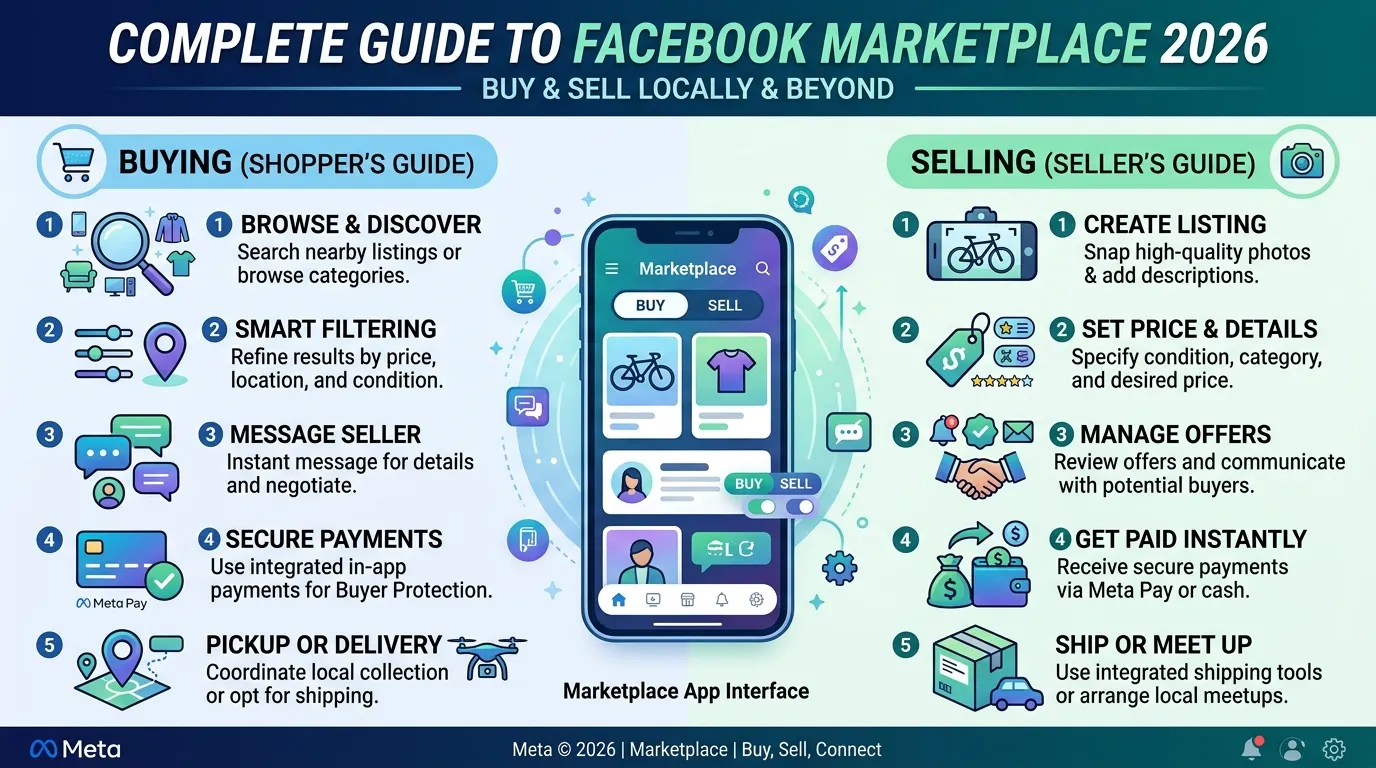
Did you know that over one billion people use the Facebook Marketplace app every month to buy and sell items in their local communities? That makes it one of the largest peer-to-peer selling platforms in the world and yet many users only scratch the surface of what it can do. Whether you’re trying to declutter your home, find a great deal on furniture, or even run a small side business, Marketplace has tools for all of it.
The Facebook Marketplace app integrates directly into the Facebook platform; there’s no separate download required. It’s accessible through the Facebook app on Android and iPhone, as well as through Facebook’s website on desktop. In 2026, it expanded significantly with shipping options, vehicle and property listings, and a more structured selling experience.
In this guide, you’ll learn everything about the Facebook Marketplace app: how to navigate it, how to buy and sell safely, how to spot and avoid scams, tips for getting better results as both a buyer and seller, and how it compares to other platforms. Let’s get into it.
What Is the Facebook Marketplace App and How Does It Work?
The Facebook Marketplace app is a buying and selling feature built directly into Facebook. It launched in 2016 as a simple local listing board and has since grown into a full commerce platform with local pickup, shipping, payments, vehicle sales, property rentals, and business storefronts.
Unlike dedicated e-commerce platforms, Facebook Marketplace operates primarily on trust built through social connections. When you view a seller’s listing, you can see their Facebook profile, mutual friends, member-since date, and any public ratings from previous transactions. This social layer gives Marketplace a different dynamic from anonymous platforms.
How Listings Work
Anyone with a Facebook account can create a listing on Marketplace. You post photos, a description, a price, and your location. The listing then appears to nearby Facebook users who browse Marketplace prioritizing users within your set distance radius.
Buyers contact sellers through Facebook Messenger, which handles all communication within the platform. Negotiations, questions, meetup arrangements, and payment discussions all happen through Messenger conversations linked to the listing.
Two Main Transaction Types
Local pickup The traditional Marketplace model. Buyer and seller agree on a price, meet in person, exchange the item and payment directly. No shipping fees, no platform payment processing for most items.
Shipping with purchase protection For eligible items, sellers can offer shipping. Facebook processes the payment and provides both parties with purchase protection. This enables transactions across the country rather than just locally.
Moreover, Facebook has expanded Marketplace into specific categories with dedicated experiences. Vehicles have their own search filters and financing options, property rentals include detailed listing templates, and new items from retailers appear alongside individual seller listings.
Practical Tip: When you first open Facebook Marketplace, set your location radius immediately. The default radius may be too narrow to show you all available listings or too wide to find genuinely local sellers. Experiment with 10, 25, and 50-mile radii to find the sweet spot for your area.
How to Access and Set Up Facebook Marketplace
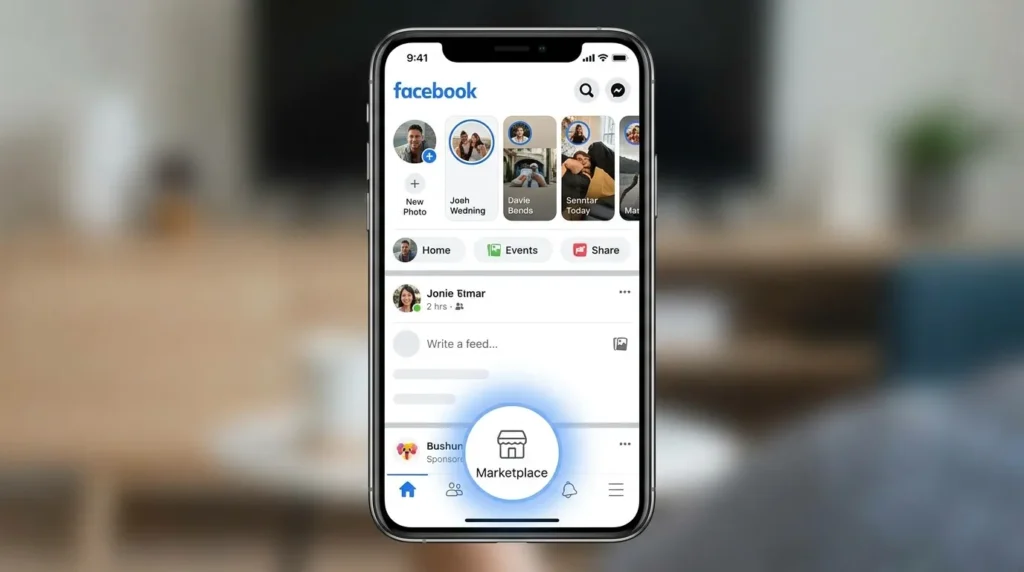
Accessing the Facebook Marketplace app doesn’t require a separate download. It’s built into the Facebook app which you can find on the Google Play Store for Android devices.
Accessing Marketplace on Android
- Open the Facebook app on your Android device
- Tap the Marketplace icon it looks like a small storefront and appears in the bottom navigation bar or the main menu (☰)
- Set your location if prompted Marketplace uses your location to show nearby listings
- Browse listings on the home screen Facebook automatically shows items matching your likely interests
Accessing Marketplace on Desktop
On a desktop or laptop, go to facebook.com and click “Marketplace” in the left sidebar. The desktop version offers the same functionality as the mobile app, though many users find the mobile experience more convenient for browsing.
What You Need to Use Marketplace
- A Facebook account in good standing
- Your account must be at least a few days old (very new accounts sometimes have Marketplace access restricted temporarily)
- A verified location or zip code for local listings
- For selling with shipping: a linked bank account and payment method
Setting Up Your Seller Profile
Before listing anything, take a few minutes to improve your seller profile. Add a clear profile photo, ensure your account shows your correct general location, and consider enabling the optional seller ratings feature. Buyers feel more confident purchasing from sellers with visible profiles and positive transaction history.
Practical Tip: If Marketplace doesn’t appear in your Facebook app navigation, update the Facebook app to the latest version through the Google Play Store. Older versions sometimes don’t display the Marketplace shortcut in the expected location.
How to Buy on the Facebook Marketplace App
The Facebook Marketplace app makes buying genuinely straightforward but knowing how to search effectively and evaluate listings saves you time and helps you avoid disappointment.
Searching for Items
The search bar at the top of Marketplace lets you search by keyword, category, and price range. Use the filter options to narrow results by:
- Distance show only listings within a specific radius of your location
- Price range set minimum and maximum prices
- Condition new, used, or any
- Category furniture, electronics, clothing, vehicles, etc.
- Availability items available for local pickup, shipping, or both
Additionally, Marketplace’s algorithm learns your browsing behavior over time. The more you interact with certain categories, the more relevant listings appear on your home screen automatically.
Evaluating a Listing Before Contacting
Before messaging a seller, review these elements of any listing:
- Photos are there multiple clear photos from different angles? Single blurry photos are a concern
- Description does it include relevant details like dimensions, age, condition, and reason for selling?
- Price does it seem reasonable compared to similar items? Extremely low prices warrant extra scrutiny
- Seller profile: how long have they been on Facebook? Do they have mutual friends? Any previous ratings?
- Response time Marketplace shows an approximate response time for sellers
Making an Offer
Most Marketplace listings accept offers below the asking price. Tap “Make Offer” on the listing to send a specific price. Be reasonable offers significantly below the listed price often get ignored or declined. A 10% to 20% discount from the asking price is typically a reasonable starting negotiation point for most items.
Practical Tip: When messaging a seller, ask specific questions about the item before arranging to meet. Request additional photos of any areas that concern you. Sellers who respond promptly with helpful information are generally much more reliable than those who give vague or evasive answers.
How to Sell Successfully on Facebook Marketplace
Selling on the Facebook Marketplace app effectively comes down to presentation, pricing, and communication. Here’s what actually makes listings perform well.
Photography Makes the Biggest Difference
Good photos drive more inquiries than almost anything else. Using natural lighting when possible near a window works well. Take multiple shots from different angles. Showing any imperfections honestly this builds trust and reduces the chance of buyers canceling after seeing the item in person.
Photo checklist for any listing:
- At least 3–5 photos from different angles
- One photo showing the full item
- Close-ups of any damage, wear, or notable features
- A photo showing scale place a common object nearby for reference
- Photos in good lighting without clutter in the background
Writing Effective Descriptions
Your description should answer every question a buyer might have before they need to ask. Include:
- Exact dimensions (for furniture, appliances, and large items)
- Age and condition honestly described
- Original purchase price if relevant
- Reason for selling “moving,” “upgrading,” or “gift that doesn’t fit” all reassure buyers
- Any accessories, manuals, or extras included
Pricing Strategically
Search Marketplace for similar items before setting your price. A competitive price generates more inquiries faster. Price slightly above your minimum acceptable amount most buyers will negotiate, so leaving 5% to 15% room gives you flexibility without undervaluing the item.
Responding Quickly
Marketplace shows your typical response time on your seller profile. Fast responses under an hour significantly increase the chance of closing a sale before the buyer moves on to another listing. Enable Messenger notifications so you don’t miss incoming inquiries.
Practical Tip: Renew your listings every few days if they’re not selling. Marketplace shows newer listings more prominently in search results. Tap “Manage listings” in your Marketplace profile and select “Renew” to push a listing back to the top of search results without editing or reposting it.
Facebook Marketplace Safety Avoiding Scams and Staying Protected
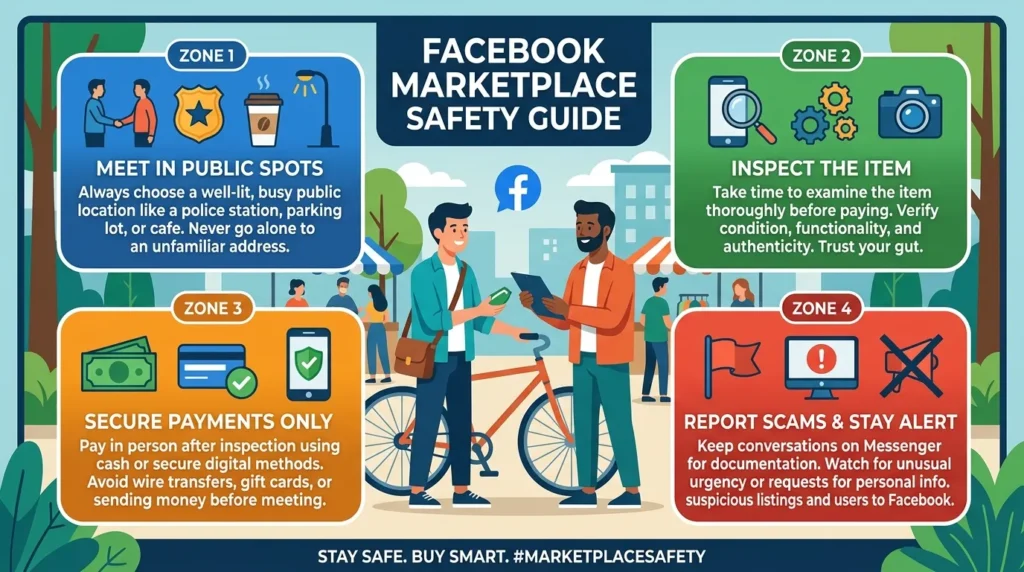
The Facebook Marketplace app is generally safe, but scams do exist. Knowing the most common ones and how to avoid them protects both your money and your personal information.
Most Common Buyer Scams
Fake payment screenshots A “buyer” sends a fake PayPal or bank transfer screenshot claiming they’ve paid before receiving the item. Always verify payment has actually arrived in your account before handing over anything.
Overpayment scams A buyer offers to pay more than your asking price (usually by check) and asks you to send the difference back. The original payment bounces; you lose the difference you sent.
“I’ll send a shipper” scams. Someone offers to buy at full price but says they’ll “send someone to pick it up” and pay through a specific service. This is almost always a scam. Legitimate buyers don’t require unusual payment arrangements.
Most Common Seller Scams
Bait-and-switch The item in photos looks great but the actual item is in much worse condition. Always inspect items thoroughly before payment.
Missing items Boxes that should contain multiple items arrive missing components. Open and verify items completely before the seller leaves.
Non-delivery with shipping For shipped items outside of Facebook’s checkout system, there’s little recourse if a seller doesn’t ship. Always use Facebook’s built-in checkout for shipped purchases; it includes purchase protection.
Safe Transaction Practices
- Meet in public places parking lots of police stations, busy shopping centers, or bank lobbies are popular choices
- Bring a friend for high-value transactions
- Use cash for local transactions it’s immediate, final, and doesn’t involve sharing payment details
- For shipped items, only use Facebook’s official checkout never pay outside the platform
- Never share personal financial details through Messenger
Practical Tip: Many police departments in the US and other countries designate specific “safe exchange zones” in their parking lots specifically for Marketplace and similar transactions. Search “[your city] safe exchange zone” to find one near you; it’s the safest possible meeting location for any in-person transaction.
Tips to Get Better Results on the Facebook Marketplace App
Whether you’re buying or selling, these practical tips help you get more value from the Facebook Marketplace app in 2026.
For Buyers
Check listings multiple times per day, new items appear constantly, and popular items sell within hours or even minutes. Setting up saved searches with notifications helps you catch desirable items quickly.
Search with multiple keywords sellers use different terms for the same item. Search “sofa,” “couch,” and “settee” separately for furniture. “TV” and “television” return different results. This broadens your results significantly.
Be ready to move quickly for well-priced items, express clear interest, confirm you’re serious, and propose a meetup time in your first message. Sellers prefer buyers who seem committed over those who ask questions for days without committing.
For Sellers
Post in the morning Marketplace activity peaks in the morning and early afternoon. Listings posted around 7–9am get more initial exposure than those posted late at night.
Cross-post to local Buy/Sell groups Facebook allows you to share Marketplace listings to local community buying and selling groups simultaneously. This dramatically increases your listing’s visibility beyond just Marketplace search results.
Bundle items selling multiple related items together at a slight discount often produces faster sales than listing each item individually. “Bundle of children’s books 20 books for $15” sells faster than 20 individual $1 listings.
Be honest about condition buyers who feel misled leave negative ratings. Accurate descriptions build your seller reputation over time, which makes future sales easier.
Practical Tip: Save your best-performing listing descriptions and photo setups for categories you sell in regularly. Reusing a format that works well saves setup time and produces consistent results for similar items you list in the future.
Facebook Marketplace vs Other Selling Platforms Comparison
| Platform | Listing Fees | Selling Fees | Shipping Option | Buyer Protection | Local Pickup | Best For |
| Facebook Marketplace | ❌ Free | ✅ 5% (shipped) | ✅ Yes | ✅ Shipped only | ✅ Yes | Local selling + wide reach |
| eBay | ❌ Free (limited) | ✅ ~12.9% + fees | ✅ Yes | ✅ Yes strong | ✅ Yes | Collectibles, electronics |
| Craigslist | ❌ Free (mostly) | ❌ None | ❌ No | ❌ None | ✅ Yes | Local cash transactions |
| OfferUp | ❌ Free | ✅ 12.9% (shipped) | ✅ Yes | ✅ Yes | ✅ Yes | Local selling and cars |
| Poshmark | ❌ Free | ✅ 20% (over $15) | ✅ Yes | ✅ Yes | ❌ No | Fashion and clothing |
Frequently Asked Questions
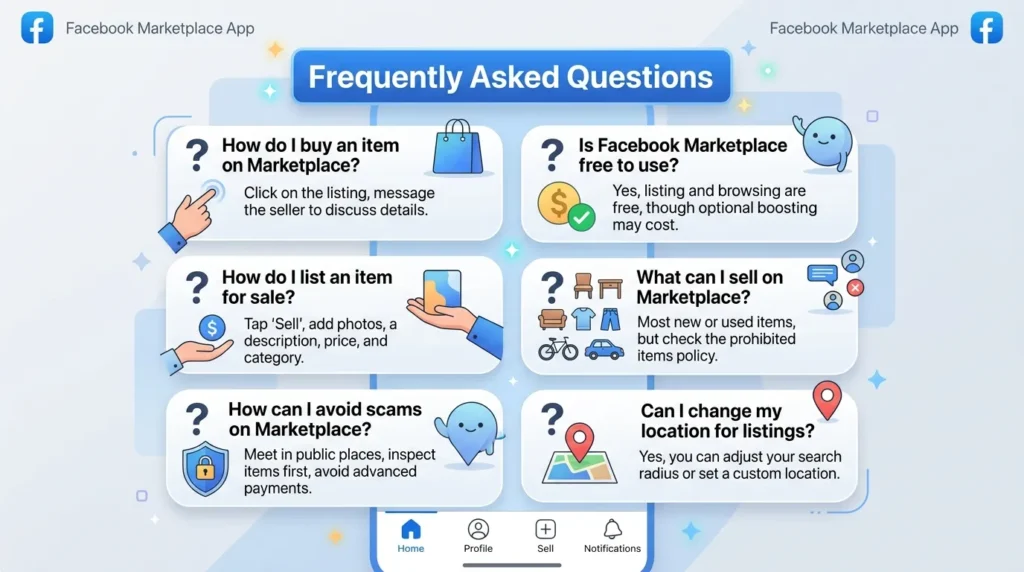
Is the Facebook Marketplace app free to use?
Yes the Facebook Marketplace app is completely free to access through the Facebook app. Listing items for local pickup carries no fees. Selling with shipping incurs a 5% selling fee (minimum $0.40 per transaction) that covers buyer protection and payment processing. There are no listing fees, monthly subscription costs, or fees for browsing and buying local pickup items.
Do I need a separate app for Facebook Marketplace?
No, the Facebook Marketplace app is built directly into the standard Facebook app. Download Facebook from the Google Play Store for Android or the App Store for iPhone, and Marketplace appears as a tab within the app. There’s no separate Marketplace app to download. You can also access it through Facebook’s website on any desktop browser.
How do I stay safe when meeting someone from Facebook Marketplace?
Always meet in a public, well-lit location ideally a busy parking lot, a coffee shop, or a designated safe exchange zone at a police department. Bring a friend for high-value transactions. Inspect items thoroughly before paying. Use cash for local transactions to avoid payment disputes. Never invite strangers to your home for in-person Marketplace transactions.
Why is my Facebook Marketplace not showing listings in my area?
Several factors affect Marketplace listing visibility. First, check that you’ve set your correct location in Marketplace settings. Additionally, very new Facebook accounts sometimes have restricted Marketplace access that resolves automatically after a few days of account activity. If problems persist, update the Facebook app to the latest version through the Play Store and try again.
How does Facebook Marketplace purchase protection work?
Facebook’s purchase protection applies when you buy shipped items through Facebook’s official checkout system, not for cash local pickup transactions. If an item doesn’t arrive, arrives significantly different from the listing description, or arrives damaged, you can file a dispute through Facebook and receive a refund. This protection does not cover items paid for outside Facebook’s checkout (cash, Venmo, PayPal Friends & Family, etc.) which is why paying through the platform matters for shipped purchases.
Conclusion
The Facebook Marketplace app has evolved into one of the most powerful and accessible buying and selling platforms available in 2026 completely free to use, integrated into a platform a billion people already use daily, and filled with opportunities for both buyers looking for deals and sellers looking to convert unwanted items into cash.
To recap the three key takeaways: good photos and honest descriptions make the single biggest difference in selling speed; always meet in public for local transactions and use Facebook’s official checkout for shipped items; and learning to spot common scams protects you from the small but real risks that exist on any peer-to-peer platform.
Open the Facebook Marketplace app today, browse your local listings for something you’ve been looking for, or post that item you’ve been meaning to sell for months. The process takes minutes and the results might surprise you.
Here’s a question worth thinking about what’s sitting in your home right now that someone else would genuinely value and pay for? Share what you’ve successfully sold or bought on Marketplace in the comments below.
Disclaimer
This article is written for informational and educational purposes only. Facebook Marketplace is a feature of the Facebook platform, developed and operated by Meta Platforms, Inc. All transactions on Facebook Marketplace are between individual buyers and sellers Meta is not a party to individual transactions unless purchase protection applies to shipped items through Facebook’s official checkout. Always exercise personal judgment and common sense when conducting transactions with strangers. We are not affiliated with Meta Platforms, Inc. Download the Facebook app exclusively from the official Google Play Store or Apple App Store. The author accepts no responsibility for any financial loss, fraud, or personal harm arising from transactions conducted through Facebook Marketplace. For the latest Marketplace policies and seller fees, refer to Meta’s official Help Center.